Monthly habit tracker
Tick off each day you kept a habit — a workout, reading, drinking water, an early start. The sheet works out the completion rate for every habit and draws a progress bar beside it.
- Your file never leaves your device
- Free
- No sign-up
Tracking habits
1List your habits
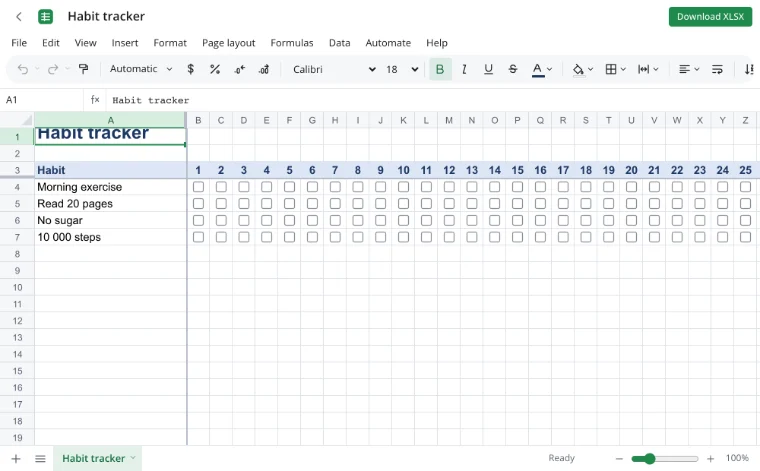
One per row, in a few words so the list fits on a phone screen.
2Tick the days
Tap a day's cell to check it.
3Watch the bars
The column on the right shows the share of days done, with a bar that fills up as you go.
Frequently asked questions
Do I need an account or a subscription?
No. The tool is free and needs no sign-up. An account only adds cloud storage, so your workbooks follow you between devices and save themselves.
Can I tick boxes on my phone?
Yes — the checkboxes are easy to tap in a mobile browser.
How do I start a new month?
Duplicate the sheet, select the day cells and press Delete to clear the ticks.
Can I track more habits?
Add rows below the list and copy the progress formula down; the bars extend with it.
More tools
- Household budget templateA free household budget spreadsheet: income and expenses by category, plan versus actual, variances and totals calculated for you.
- Invoice templateAn invoice spreadsheet that does the math: line totals, subtotal, tax and grand total calculate automatically.
- Loan calculator with amortization scheduleA loan calculator spreadsheet with a full amortization schedule: monthly payment, total interest and month-by-month balance.
- Weekly planner templateA weekly planner spreadsheet with days across and hours down.
- Convert CSV to XLSX onlineConvert CSV to XLSX in your browser.
- Convert XLSX to CSVExport a sheet from an XLSX workbook to CSV with a comma, semicolon or tab delimiter.
- Convert a spreadsheet to PDFTurn an XLSX, ODS or CSV spreadsheet into a PDF with proper page breaks, headers, footers and charts — just like printing.
- Convert ODS to XLSXConvert OpenDocument spreadsheets (ODS) to XLSX with sheets, formulas, number formats and styling intact.