Invoice template
Send a clean, professional invoice in minutes. Enter your details and the line items; line totals, subtotal, tax and the amount due calculate themselves. Save it as PDF and send it off.
- Your file never leaves your device
- Free
- No sign-up
Making an invoice
1Add the details
Your business and the client's, plus the invoice number and date.
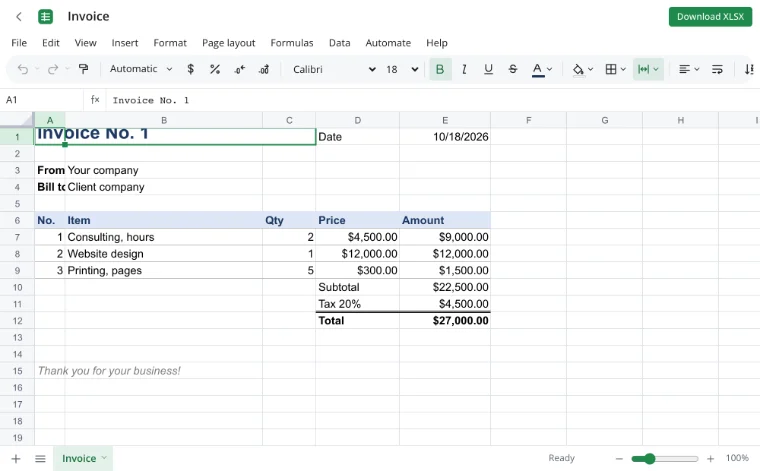
2List the items
Description, quantity and unit price — each line total and the grand total use formulas.
3Export to PDF
File → Download → PDF gives you a one-page invoice ready to email or print.
Frequently asked questions
Do I need an account or a subscription?
No. The tool is free and needs no sign-up. An account only adds cloud storage, so your workbooks follow you between devices and save themselves.
Can I change the tax rate?
Yes. Edit the rate in the tax formula, or delete the tax row if you do not charge tax.
Can I add my logo?
Yes — Insert → Picture and choose an image from your device.
How do I number invoices?
Keep one workbook per client or year and duplicate the sheet for each new invoice, raising the number in the top-left cell.
More tools
- Household budget templateA free household budget spreadsheet: income and expenses by category, plan versus actual, variances and totals calculated for you.
- Loan calculator with amortization scheduleA loan calculator spreadsheet with a full amortization schedule: monthly payment, total interest and month-by-month balance.
- Weekly planner templateA weekly planner spreadsheet with days across and hours down.
- Monthly habit trackerA monthly habit tracker spreadsheet with a checkbox for every day, a completion rate per habit and progress bars.
- Convert CSV to XLSX onlineConvert CSV to XLSX in your browser.
- Convert XLSX to CSVExport a sheet from an XLSX workbook to CSV with a comma, semicolon or tab delimiter.
- Convert a spreadsheet to PDFTurn an XLSX, ODS or CSV spreadsheet into a PDF with proper page breaks, headers, footers and charts — just like printing.
- Convert ODS to XLSXConvert OpenDocument spreadsheets (ODS) to XLSX with sheets, formulas, number formats and styling intact.