Convert CSV to XLSX online
Exports from banks, online stores, analytics tools and databases usually arrive as CSV — one long text file that loses its columns, numbers and dates the moment you open it the wrong way. This converter turns it into a proper XLSX workbook in one step.
- Your file never leaves your device
- Free
- No sign-up
How to convert a CSV file to XLSX
1Choose the CSV
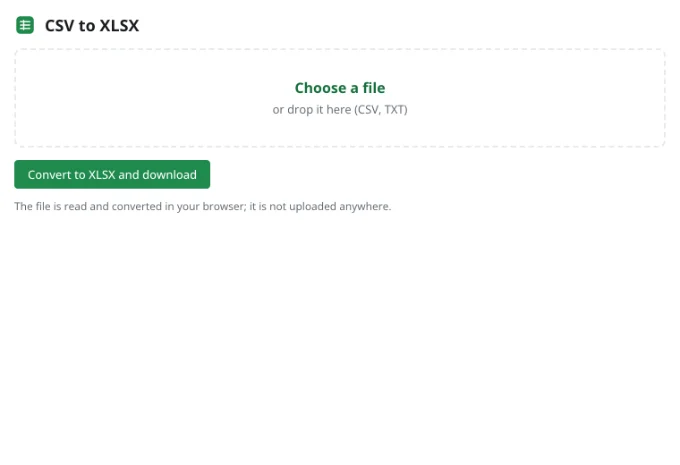
Drag the file into the tool above or click Choose a file. Files ending in .csv or .txt up to 100 MB are fine.
2Check the preview
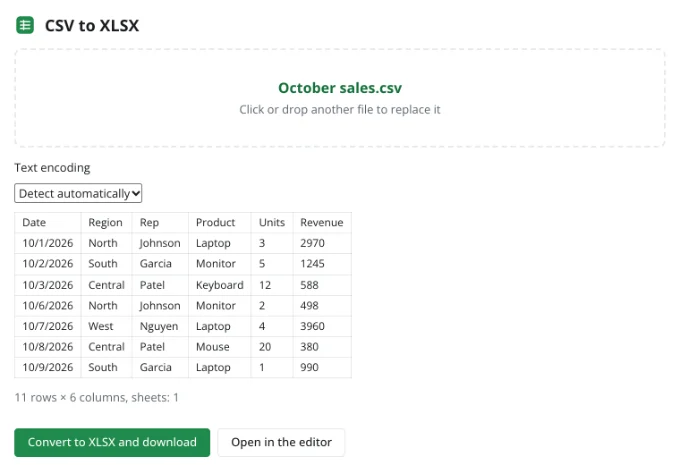
The first rows appear as a table. If accented letters or symbols look garbled, pick the text encoding yourself — the preview updates instantly.
3Download the XLSX
Click Convert to XLSX and download. The workbook lands in your downloads folder and opens in any spreadsheet app.
What the converter takes care of
The delimiter — comma, semicolon or tab — is worked out from the first lines of the file. Quoted fields, quotes inside quotes, line breaks inside a cell and empty values follow the CSV rules, so columns stay aligned even in messy exports.
Values that look like numbers, currency amounts with thousands separators and dates are stored as real numbers and dates, ready for SUM, sorting and filters without a round of cleanup. Identifiers with leading zeros, like ZIP codes or SKUs, are best opened in the editor with the column set to Text first.
Encodings without guesswork
A CSV file does not say which encoding it uses, which is why the same file can look perfect in one program and broken in another. The converter recognizes UTF-8 with or without a byte-order mark, UTF-16 and common single-byte encodings such as Windows-1252 and ISO-8859-1.
When automatic detection picks the wrong one, choose another from the list and compare the preview before you download anything.
UTF-8
The default for the web and modern software; right for most files.
Windows-1252 / ISO-8859-1
Western European text from older desktop software and legacy systems.
UTF-16
Some database and reporting tools export this; it is detected from its byte-order mark.
When you need more than a conversion
Open in the editor moves the data into the full app, where you can delete columns, split full names, remove duplicates, build a pivot table or a chart, and then download the finished XLSX.
CSV versus XLSX
| CSV | XLSX | |
|---|---|---|
| Sheets per file | One | As many as you need |
| Number and date formats | None — plain text | Kept |
| Formulas | Values only | Kept and recalculated |
| Column widths and styling | No | Yes |
| Text encoding | Depends on the exporting app | Always Unicode |
Frequently asked questions
Is my file uploaded anywhere?
No. The spreadsheet is read and written by your browser, on your device. It only reaches Zotu's servers if you choose to save it to your cloud from the full editor.
Do I need an account or a subscription?
No. The tool is free and needs no sign-up. An account only adds cloud storage, so your workbooks follow you between devices and save themselves.
Why does my CSV show strange characters?
It was saved in one encoding and opened in another. The converter detects the encoding automatically and lets you override it.
Which delimiters are supported?
Commas, semicolons and tabs are detected on their own. For anything else, open the file in the editor and use Data → Text to columns.
Will leading zeros survive?
Values such as 00123 are read as numbers. To keep the zeros, open the file in the editor, format the column as Text and paste the values again.
Can I combine several CSV files?
Yes — open the first in the editor, open the next in another tab, then copy its rows onto a new sheet or below the existing data.
More tools
- Convert XLSX to CSVExport a sheet from an XLSX workbook to CSV with a comma, semicolon or tab delimiter.
- Convert a spreadsheet to PDFTurn an XLSX, ODS or CSV spreadsheet into a PDF with proper page breaks, headers, footers and charts — just like printing.
- Convert ODS to XLSXConvert OpenDocument spreadsheets (ODS) to XLSX with sheets, formulas, number formats and styling intact.
- Convert XLSX to ODSSave an XLSX workbook as an OpenDocument spreadsheet (ODS) with all sheets, formulas, number formats and styling.
- Convert a spreadsheet to an HTML tableTurn a sheet from XLSX, ODS or CSV into a styled HTML table with fonts, colors, borders and merged cells — ready for websites, wikis and emails.
- Convert TSV to XLSXConvert TSV files or tab-separated text to XLSX: columns line up, numbers and dates are recognized, and any language's characters read correctly.
- Open an XLSX file onlineOpen XLSX, ODS or CSV files online and edit them right away: formulas, filters and charts work.
- Edit CSV files onlineEdit CSV files online in a real grid: sort, filter, find and replace, remove duplicates and split columns, then save back to CSV without breaking quotes.