Open an XLSX file online
Someone sent you a spreadsheet and you are on a machine without the right software? Open it in the browser: formulas recalculate, filters and charts work, and you can download the edited workbook as XLSX.
- Your file never leaves your device
- Free
- No sign-up
How to open an XLSX file in your browser
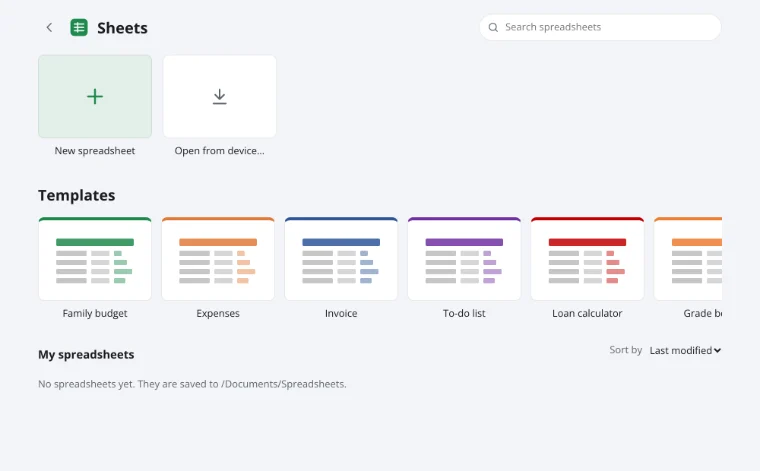
1Click Open from device
In the window below, pick a file from your computer or phone: XLSX, XLSM, ODS, CSV or TSV.
2View and edit
Switch sheets, filter, change values and formulas — it behaves like a desktop spreadsheet.
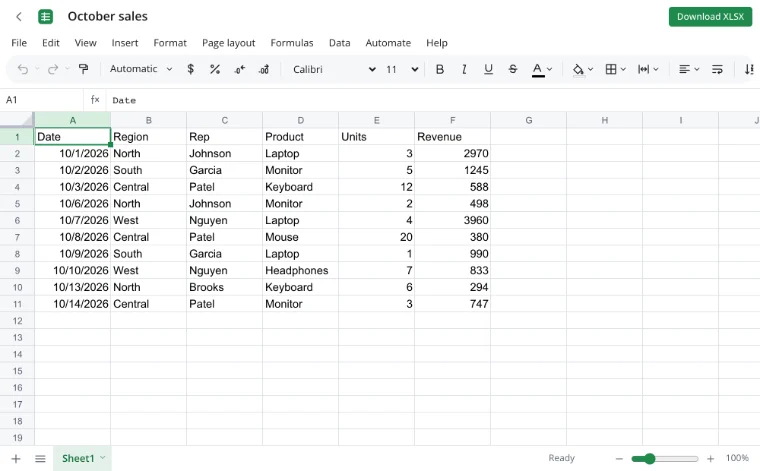
3Download your changes
Download XLSX saves the workbook to your device; the File menu offers other formats.
What is supported
Formulas
560 functions, dynamic arrays, names and cross-sheet references recalculate as soon as the file opens.
Formatting
Number formats, styles, merges, conditional formatting and data validation look as they did in the original app.
Objects
Charts, pictures, shapes, notes and threaded comments.
Protection
Protected sheets stay protected; entering the password unprotects them, as in desktop apps.
If a file will not open
The legacy XLS format (before 2007) is not supported yet — resave it as XLSX in the app that created it. Macro-enabled XLSM workbooks open, but macros do not run, and saving writes an XLSX.
Frequently asked questions
Is my file uploaded anywhere?
No. The spreadsheet is read and written by your browser, on your device. It only reaches Zotu's servers if you choose to save it to your cloud from the full editor.
Do I need an account or a subscription?
No. The tool is free and needs no sign-up. An account only adds cloud storage, so your workbooks follow you between devices and save themselves.
Can I open files on my phone?
Yes. The editor works in mobile browsers: scroll, pinch to zoom and edit cells with your finger.
What about password-encrypted workbooks?
Encrypted files are not supported yet. Remove the open password in the original app, then open the file here.
Are my edits saved automatically?
Not without an account — use Download XLSX. With a Zotu account, workbooks save to your cloud as you go.
More tools
- Edit CSV files onlineEdit CSV files online in a real grid: sort, filter, find and replace, remove duplicates and split columns, then save back to CSV without breaking quotes.
- Spreadsheet function referenceAll 560 spreadsheet functions by category — math, text, dates, lookup, statistics, finance and more — with short descriptions and a live editor to try them.
- Convert CSV to XLSX onlineConvert CSV to XLSX in your browser.
- Convert XLSX to CSVExport a sheet from an XLSX workbook to CSV with a comma, semicolon or tab delimiter.
- Convert a spreadsheet to PDFTurn an XLSX, ODS or CSV spreadsheet into a PDF with proper page breaks, headers, footers and charts — just like printing.
- Convert ODS to XLSXConvert OpenDocument spreadsheets (ODS) to XLSX with sheets, formulas, number formats and styling intact.
- Convert XLSX to ODSSave an XLSX workbook as an OpenDocument spreadsheet (ODS) with all sheets, formulas, number formats and styling.
- Convert a spreadsheet to an HTML tableTurn a sheet from XLSX, ODS or CSV into a styled HTML table with fonts, colors, borders and merged cells — ready for websites, wikis and emails.