Spreadsheet function reference
Every function the editor understands, in one list: from SUM and IF to XLOOKUP, LET and LAMBDA. Browse by category and try any of them in the editor above — results match what you get in mainstream spreadsheet apps.
- Your file never leaves your device
- Free
- No sign-up
Writing a formula
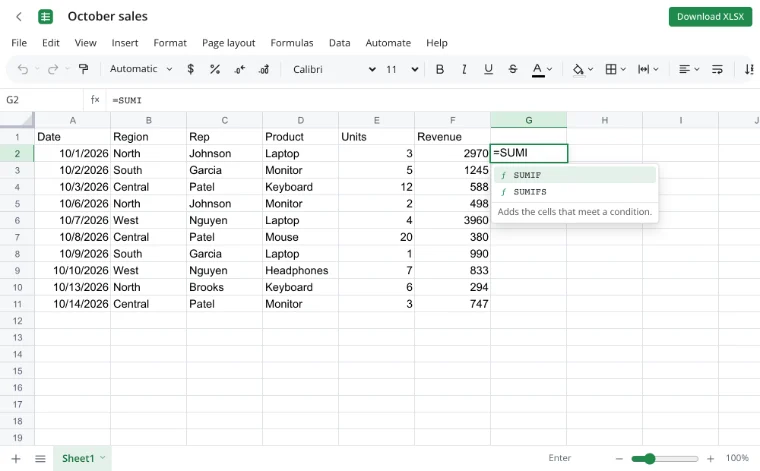
1Type an equals sign
Every formula starts with =. After a couple of letters, matching functions appear with their arguments.
2Fill in the arguments
Click cells or drag across ranges to insert references; separate arguments with commas.
3Read the result
If you get an error, hover the cell — the status bar explains it — or use Evaluate formula to watch the calculation step by step.
Functions worth learning first
SUM, SUMIF, SUMIFS
Totals, and totals that match one or more conditions.
IF, IFS, IFERROR
Branching logic and friendly replacements for error values.
XLOOKUP, VLOOKUP, INDEX + MATCH
Find a value in a table, from the classic lookup to the flexible modern one.
COUNTIFS, AVERAGEIFS
Counts and averages that meet several criteria.
TEXT, TEXTJOIN, TEXTSPLIT
Format numbers as text, join strings, split them apart.
FILTER, SORT, UNIQUE
Dynamic arrays that return whole result sets from a single formula.
Dynamic arrays and lambdas
Formulas like FILTER, SORT and SEQUENCE spill their results into neighboring cells, and A1# refers to the whole spilled range. LET names intermediate results, LAMBDA turns a formula into a reusable function, and MAP, REDUCE, SCAN, BYROW and BYCOL apply it across arrays.
Every function, by category
Function names are the standard English ones used across spreadsheet programs. For arguments and an example of any function, open the editor and choose Formulas → Insert function.
Financial (56)
- ACCRINT
- Accrued interest of a security that pays interest periodically.
- ACCRINTM
- Accrued interest of a security that pays interest at maturity.
- AMORDEGRC
- Depreciation for each accounting period using a depreciation coefficient.
- AMORLINC
- Linear depreciation for each accounting period.
- COUPDAYBS
- Days from the start of the coupon period to the settlement date.
- COUPDAYS
- Days in the coupon period that contains the settlement date.
- COUPDAYSNC
- Days from the settlement date to the next coupon date.
- COUPNCD
- The next coupon date after the settlement date.
- COUPNUM
- Number of coupons payable between settlement and maturity.
- COUPPCD
- The last coupon date before the settlement date.
- CUMIPMT
- Total interest paid on a loan between two periods.
- CUMPRINC
- Total principal repaid on a loan between two periods.
- DB
- Depreciation of an asset for a period using the fixed declining balance method.
- DDB
- Depreciation of an asset for a period using the double declining balance method or another factor.
- DISC
- Discount rate of a security.
- DOLLARDE
- Turns a price written as a fraction into a decimal number.
- DOLLARFR
- Turns a decimal price into a price written as a fraction.
- DURATION
- Annual duration of a security with periodic interest payments.
- EFFECT
- Effective annual interest rate from a nominal rate.
- FV
- Future value of an investment with constant payments and a constant rate.
- FVSCHEDULE
- Future value of a principal after applying a series of interest rates.
- INTRATE
- Interest rate of a fully invested security.
- IPMT
- Interest part of a loan payment for a given period.
- IRR
- Internal rate of return of a series of cash flows.
- ISPMT
- Interest paid in a period of a loan with equal principal repayments.
- MDURATION
- Modified duration of a security.
- MIRR
- Internal rate of return when borrowing and reinvestment use different rates.
- NOMINAL
- Nominal annual interest rate from an effective rate.
- NPER
- Number of periods needed to pay off a loan or reach an investment goal.
- NPV
- Net present value of future cash flows at a discount rate.
- ODDFPRICE
- Price per 100 face value of a security with an irregular first period.
- ODDFYIELD
- Yield of a security with an irregular first period.
- ODDLPRICE
- Price per 100 face value of a security with an irregular last period.
- ODDLYIELD
- Yield of a security with an irregular last period.
- PDURATION
- Number of periods an investment needs to reach a given value.
- PMT
- Periodic payment of a loan with constant payments and a constant rate.
- PPMT
- Principal part of a loan payment for a given period.
- PRICE
- Price per 100 face value of a security that pays periodic interest.
- PRICEDISC
- Price per 100 face value of a discounted security.
- PRICEMAT
- Price per 100 face value of a security that pays interest at maturity.
- PV
- Present value of a series of future payments.
- RATE
- Interest rate per period of a loan or annuity.
- RECEIVED
- Amount received at maturity for a fully invested security.
- RRI
- Equivalent interest rate for the growth of an investment.
- SLN
- Straight-line depreciation of an asset for one period.
- STOCKHISTORY
- Historical price data for a financial instrument. Needs an online service that is not available yet.
- SYD
- Sum-of-years' digits depreciation of an asset for a period.
- TBILLEQ
- Bond-equivalent yield of a treasury bill.
- TBILLPRICE
- Price per 100 face value of a treasury bill.
- TBILLYIELD
- Yield of a treasury bill.
- VDB
- Depreciation of an asset over any span of periods using a declining balance method.
- XIRR
- Internal rate of return of cash flows that are not necessarily periodic.
- XNPV
- Net present value of cash flows that are not necessarily periodic.
- YIELD
- Yield of a security that pays periodic interest.
- YIELDDISC
- Annual yield of a discounted security.
- YIELDMAT
- Annual yield of a security that pays interest at maturity.
Logical (19)
- AND
- TRUE if all of the arguments are true.
- BYCOL
- Applies a LAMBDA to each column and returns one result per column.
- BYROW
- Applies a LAMBDA to each row and returns one result per row.
- FALSE
- The logical value FALSE.
- IF
- Returns one value when a condition is true and another when it is false.
- IFERROR
- Returns a fallback value when the expression results in an error.
- IFNA
- Returns a fallback value when the expression results in #N/A.
- IFS
- Checks conditions in order and returns the value for the first one that is true.
- LAMBDA
- Creates a reusable custom function with named parameters.
- LET
- Gives names to intermediate results and uses them in a final calculation.
- MAKEARRAY
- Builds an array of the given size by calling a LAMBDA for every cell.
- MAP
- Applies a LAMBDA to each value of one or more arrays.
- NOT
- Reverses a logical value.
- OR
- TRUE if at least one argument is true.
- REDUCE
- Folds an array into a single value by applying a LAMBDA to an accumulator and each value.
- SCAN
- Applies a LAMBDA cumulatively and returns every intermediate result.
- SWITCH
- Compares an expression with a list of values and returns the result for the first match.
- TRUE
- The logical value TRUE.
- XOR
- TRUE if an odd number of the arguments are true.
Text (48)
- ARRAYTOTEXT
- Turns an array into a single line of text.
- ASC
- Converts full-width characters to half-width ones.
- BAHTTEXT
- Spells out a number as Thai text with the baht currency.
- CHAR
- The character with the given code.
- CLEAN
- Removes non-printable characters from text.
- CODE
- The numeric code of the first character of text.
- CONCAT
- Joins texts and the values of whole ranges together.
- CONCATENATE
- Joins several text values into one.
- DBCS
- Converts half-width characters to full-width ones.
- DOLLAR
- Formats a number as text in the currency format.
- EXACT
- Checks whether two texts are exactly the same, including case.
- FIND
- Position of one text inside another, case-sensitive.
- FINDB
- Position of one text inside another, counted in bytes.
- FIXED
- Rounds a number and formats it as text with a fixed number of decimals.
- JIS
- Converts half-width characters to full-width ones.
- LEFT
- The first characters of a text.
- LEFTB
- The first characters of a text, counted in bytes.
- LEN
- Number of characters in a text.
- LENB
- Number of bytes in a text.
- LOWER
- Converts text to lowercase.
- MID
- A given number of characters from the middle of a text.
- MIDB
- Characters from the middle of a text, counted in bytes.
- NUMBERVALUE
- Converts text to a number regardless of locale separators.
- PHONETIC
- The phonetic (furigana) reading stored with a cell.
- PROPER
- Capitalizes the first letter of each word.
- REGEXEXTRACT
- Extracts the parts of a text that match a regular expression.
- REGEXREPLACE
- Replaces the parts of a text that match a regular expression.
- REGEXTEST
- Checks whether a text matches a regular expression.
- REPLACE
- Replaces part of a text at a given position with another text.
- REPLACEB
- Replaces part of a text, counted in bytes, with another text.
- REPT
- Repeats a text the given number of times.
- RIGHT
- The last characters of a text.
- RIGHTB
- The last characters of a text, counted in bytes.
- SEARCH
- Position of one text inside another, ignoring case and allowing wildcards.
- SEARCHB
- Position of one text inside another, ignoring case, counted in bytes.
- SUBSTITUTE
- Replaces occurrences of a text with another text.
- T
- Returns the value if it is text, otherwise an empty text.
- TEXT
- Formats a value as text using a number format.
- TEXTAFTER
- The part of a text after a delimiter.
- TEXTBEFORE
- The part of a text before a delimiter.
- TEXTJOIN
- Joins texts and ranges with a delimiter, optionally skipping empty values.
- TEXTSPLIT
- Splits a text into columns and rows by delimiters.
- TRIM
- Removes extra spaces from text, leaving single spaces between words.
- UNICHAR
- The Unicode character with the given code.
- UNICODE
- The Unicode code of the first character of text.
- UPPER
- Converts text to uppercase.
- VALUE
- Converts text that looks like a number into a number.
- VALUETOTEXT
- Turns any value into text.
Date and time (25)
- DATE
- A date built from a year, month and day.
- DATEDIF
- The difference between two dates in days, months or years.
- DATEVALUE
- Converts a date written as text into a date value.
- DAY
- The day of the month of a date.
- DAYS
- Number of days between two dates.
- DAYS360
- Number of days between two dates in a 360-day year.
- EDATE
- The date a given number of months before or after a date.
- EOMONTH
- The last day of the month a given number of months away.
- HOUR
- The hour of a time value (0–23).
- ISOWEEKNUM
- The ISO week number of a date.
- MINUTE
- The minute of a time value (0–59).
- MONTH
- The month of a date (1–12).
- NETWORKDAYS
- Number of working days between two dates.
- NETWORKDAYS.INTL
- Number of working days between two dates with custom weekend days.
- NOW
- The current date and time.
- SECOND
- The second of a time value (0–59).
- TIME
- A time value built from hours, minutes and seconds.
- TIMEVALUE
- Converts a time written as text into a time value.
- TODAY
- The current date.
- WEEKDAY
- The day of the week of a date as a number.
- WEEKNUM
- The week number of a date within its year.
- WORKDAY
- The date a given number of working days away.
- WORKDAY.INTL
- The date a given number of working days away, with custom weekend days.
- YEAR
- The year of a date.
- YEARFRAC
- The fraction of a year between two dates.
Lookup and reference (40)
- ADDRESS
- A cell address as text from row and column numbers.
- AREAS
- Number of areas in a reference.
- CHOOSE
- Picks a value from a list by its position.
- CHOOSECOLS
- The chosen columns of an array.
- CHOOSEROWS
- The chosen rows of an array.
- COLUMN
- The column number of a reference.
- COLUMNS
- Number of columns in a range or array.
- DROP
- An array without the given number of rows or columns at its start or end.
- EXPAND
- Enlarges an array to the given size, filling new cells with a value.
- FILTER
- The rows or columns of an array that meet a condition.
- FORMULATEXT
- The formula of a cell as text.
- GETPIVOTDATA
- A value from a pivot table by field and item names.
- GROUPBY
- Groups values by row fields and aggregates each group.
- HLOOKUP
- Looks for a value in the top row of a table and returns a value from a given row.
- HSTACK
- Joins arrays side by side into one array.
- HYPERLINK
- Creates a clickable link.
- IMAGE
- Shows a picture from a web address inside a cell. Needs an online service that is not available yet.
- INDEX
- The value at a given row and column of a range or array.
- INDIRECT
- The reference named by a text.
- LOOKUP
- Looks up a value in a row or column and returns the matching value from another one.
- MATCH
- The position of a value in a row or column.
- OFFSET
- A reference shifted from a starting reference by rows and columns.
- PIVOTBY
- Groups values by row and column fields and aggregates each cell of the result.
- ROW
- The row number of a reference.
- ROWS
- Number of rows in a range or array.
- RTD
- Real-time data from a data server. Needs an online service that is not available yet.
- SORT
- Sorts the contents of a range or array.
- SORTBY
- Sorts a range or array by the values of other ranges.
- TAKE
- The given number of rows or columns from the start or end of an array.
- TOCOL
- Turns an array into a single column.
- TOROW
- Turns an array into a single row.
- TRANSPOSE
- Swaps the rows and columns of an array.
- TRIMRANGE
- A range without its empty leading and trailing rows and columns.
- UNIQUE
- The distinct values of a range or array.
- VLOOKUP
- Looks for a value in the first column of a table and returns a value from a given column.
- VSTACK
- Stacks arrays on top of each other into one array.
- WRAPCOLS
- Wraps a row or column into columns of a given length.
- WRAPROWS
- Wraps a row or column into rows of a given length.
- XLOOKUP
- Looks for a value in one range and returns the matching item from another.
- XMATCH
- The position of a value in a range, with flexible matching.
Math and trigonometry (81)
- ABS
- The absolute value of a number.
- ACOS
- The arccosine of a number, in radians.
- ACOSH
- The inverse hyperbolic cosine of a number.
- ACOT
- The arccotangent of a number, in radians.
- ACOTH
- The inverse hyperbolic cotangent of a number.
- AGGREGATE
- An aggregate such as a sum or average that can skip hidden rows and errors.
- ARABIC
- Converts a Roman numeral to a number.
- ASIN
- The arcsine of a number, in radians.
- ASINH
- The inverse hyperbolic sine of a number.
- ATAN
- The arctangent of a number, in radians.
- ATAN2
- The angle of the point (x, y) from the x-axis, in radians.
- ATANH
- The inverse hyperbolic tangent of a number.
- BASE
- Converts a number to text in another base.
- CEILING
- Rounds a number up to the nearest multiple of significance.
- CEILING.MATH
- Rounds a number up to the nearest integer or multiple, with control over negatives.
- CEILING.PRECISE
- Rounds a number up to the nearest multiple regardless of its sign.
- COMBIN
- Number of combinations of items without repetition.
- COMBINA
- Number of combinations of items with repetition.
- COS
- The cosine of an angle in radians.
- COSH
- The hyperbolic cosine of a number.
- COT
- The cotangent of an angle in radians.
- COTH
- The hyperbolic cotangent of a number.
- CSC
- The cosecant of an angle in radians.
- CSCH
- The hyperbolic cosecant of a number.
- DECIMAL
- Converts text in a given base to a decimal number.
- DEGREES
- Converts radians to degrees.
- EVEN
- Rounds a number away from zero to the nearest even integer.
- EXP
- e raised to the power of a number.
- FACT
- The factorial of a number.
- FACTDOUBLE
- The double factorial of a number.
- FLOOR
- Rounds a number down to the nearest multiple of significance.
- FLOOR.MATH
- Rounds a number down to the nearest integer or multiple, with control over negatives.
- FLOOR.PRECISE
- Rounds a number down to the nearest multiple regardless of its sign.
- GCD
- The greatest common divisor of integers.
- INT
- Rounds a number down to the nearest integer.
- ISO.CEILING
- Rounds a number up to the nearest multiple regardless of its sign.
- LCM
- The least common multiple of integers.
- LN
- The natural logarithm of a number.
- LOG
- The logarithm of a number to a given base.
- LOG10
- The base-10 logarithm of a number.
- MDETERM
- The determinant of a square matrix.
- MINVERSE
- The inverse of a square matrix.
- MMULT
- The matrix product of two arrays.
- MOD
- The remainder after division.
- MROUND
- Rounds a number to the nearest multiple.
- MULTINOMIAL
- The multinomial coefficient of a set of numbers.
- MUNIT
- An identity matrix of the given size.
- ODD
- Rounds a number away from zero to the nearest odd integer.
- PI
- The number pi.
- POWER
- A number raised to a power.
- PRODUCT
- Multiplies all its arguments.
- QUOTIENT
- The integer part of a division.
- RADIANS
- Converts degrees to radians.
- RAND
- A random number between 0 and 1.
- RANDARRAY
- An array of random numbers.
- RANDBETWEEN
- A random integer between two numbers.
- ROMAN
- Converts a number to a Roman numeral as text.
- ROUND
- Rounds a number to a given number of digits.
- ROUNDDOWN
- Rounds a number toward zero.
- ROUNDUP
- Rounds a number away from zero.
- SEC
- The secant of an angle in radians.
- SECH
- The hyperbolic secant of a number.
- SEQUENCE
- An array of sequential numbers.
- SERIESSUM
- The sum of a power series.
- SIGN
- The sign of a number: 1, 0 or -1.
- SIN
- The sine of an angle in radians.
- SINH
- The hyperbolic sine of a number.
- SQRT
- The square root of a number.
- SQRTPI
- The square root of a number multiplied by pi.
- SUBTOTAL
- A subtotal of a list that ignores other subtotals and can skip hidden rows.
- SUM
- Adds all its arguments.
- SUMIF
- Adds the cells that meet a condition.
- SUMIFS
- Adds the cells that meet several conditions.
- SUMPRODUCT
- Multiplies matching items of arrays and adds the products.
- SUMSQ
- The sum of the squares of the arguments.
- SUMX2MY2
- The sum of differences of squares of matching values in two arrays.
- SUMX2PY2
- The sum of sums of squares of matching values in two arrays.
- SUMXMY2
- The sum of squared differences of matching values in two arrays.
- TAN
- The tangent of an angle in radians.
- TANH
- The hyperbolic tangent of a number.
- TRUNC
- Truncates a number by dropping its fractional part.
Statistical (111)
- AVEDEV
- The average absolute deviation of values from their mean.
- AVERAGE
- The arithmetic mean of the arguments.
- AVERAGEA
- The mean of the arguments, counting text as 0 and TRUE as 1.
- AVERAGEIF
- The mean of the cells that meet a condition.
- AVERAGEIFS
- The mean of the cells that meet several conditions.
- BETA.DIST
- The beta distribution.
- BETA.INV
- The inverse of the cumulative beta distribution.
- BINOM.DIST
- The binomial distribution probability.
- BINOM.DIST.RANGE
- The probability that the number of successes falls in a range.
- BINOM.INV
- The smallest number of successes whose cumulative probability reaches a criterion.
- CHISQ.DIST
- The left-tailed chi-squared distribution.
- CHISQ.DIST.RT
- The right-tailed chi-squared distribution.
- CHISQ.INV
- The inverse of the left-tailed chi-squared distribution.
- CHISQ.INV.RT
- The inverse of the right-tailed chi-squared distribution.
- CHISQ.TEST
- The chi-squared test for independence.
- CONFIDENCE.NORM
- The confidence interval for a population mean using the normal distribution.
- CONFIDENCE.T
- The confidence interval for a population mean using the Student's t-distribution.
- CORREL
- The correlation coefficient of two data sets.
- COUNT
- Counts the numbers among the arguments.
- COUNTA
- Counts the non-empty values among the arguments.
- COUNTBLANK
- Counts the empty cells in a range.
- COUNTIF
- Counts the cells that meet a condition.
- COUNTIFS
- Counts the cells that meet several conditions.
- COVARIANCE.P
- The population covariance of two data sets.
- COVARIANCE.S
- The sample covariance of two data sets.
- DEVSQ
- The sum of squared deviations from the mean.
- EXPON.DIST
- The exponential distribution.
- F.DIST
- The left-tailed F distribution.
- F.DIST.RT
- The right-tailed F distribution.
- F.INV
- The inverse of the left-tailed F distribution.
- F.INV.RT
- The inverse of the right-tailed F distribution.
- F.TEST
- The F-test result for whether two samples have different variances.
- FISHER
- The Fisher transformation.
- FISHERINV
- The inverse of the Fisher transformation.
- FORECAST
- A future value predicted by a linear trend.
- FORECAST.ETS
- A future value predicted by exponential smoothing.
- FORECAST.ETS.CONFINT
- The confidence interval of an exponential-smoothing forecast.
- FORECAST.ETS.SEASONALITY
- The length of the seasonal pattern detected in a time series.
- FORECAST.ETS.STAT
- A statistic of an exponential-smoothing forecast model.
- FORECAST.LINEAR
- A future value predicted by a linear trend.
- FREQUENCY
- How many values fall into each interval, as a vertical array.
- GAMMA
- The gamma function value.
- GAMMA.DIST
- The gamma distribution.
- GAMMA.INV
- The inverse of the cumulative gamma distribution.
- GAMMALN
- The natural logarithm of the gamma function.
- GAMMALN.PRECISE
- The natural logarithm of the gamma function.
- GAUSS
- The probability that a standard normal value lies between the mean and z.
- GEOMEAN
- The geometric mean.
- GROWTH
- Values along an exponential trend.
- HARMEAN
- The harmonic mean.
- HYPGEOM.DIST
- The hypergeometric distribution.
- INTERCEPT
- The point where the linear regression line crosses the y-axis.
- KURT
- The kurtosis of a data set.
- LARGE
- The k-th largest value in a data set.
- LINEST
- Parameters of a linear trend fitted by least squares.
- LOGEST
- Parameters of an exponential trend fitted to the data.
- LOGNORM.DIST
- The lognormal distribution.
- LOGNORM.INV
- The inverse of the cumulative lognormal distribution.
- MAX
- The largest value among the arguments.
- MAXA
- The largest value, counting text as 0 and TRUE as 1.
- MAXIFS
- The largest value among the cells that meet conditions.
- MEDIAN
- The median of the arguments.
- MIN
- The smallest value among the arguments.
- MINA
- The smallest value, counting text as 0 and TRUE as 1.
- MINIFS
- The smallest value among the cells that meet conditions.
- MODE.MULT
- All of the most frequent values, as a vertical array.
- MODE.SNGL
- The most frequent value.
- NEGBINOM.DIST
- The negative binomial distribution.
- NORM.DIST
- The normal distribution.
- NORM.INV
- The inverse of the cumulative normal distribution.
- NORM.S.DIST
- The standard normal distribution.
- NORM.S.INV
- The inverse of the cumulative standard normal distribution.
- PEARSON
- The Pearson correlation coefficient.
- PERCENTILE.EXC
- The k-th percentile, with k strictly between 0 and 1.
- PERCENTILE.INC
- The k-th percentile, with k from 0 to 1 inclusive.
- PERCENTRANK.EXC
- The rank of a value as a percentage of the data set, excluding 0 and 1.
- PERCENTRANK.INC
- The rank of a value as a percentage of the data set, from 0 to 1 inclusive.
- PERMUT
- Number of permutations of items without repetition.
- PERMUTATIONA
- Number of permutations of items with repetition.
- PHI
- The density of the standard normal distribution.
- POISSON.DIST
- The Poisson distribution.
- PROB
- The probability that values fall between two limits.
- QUARTILE.EXC
- A quartile of a data set, excluding 0 and 1.
- QUARTILE.INC
- A quartile of a data set, from 0 to 1 inclusive.
- RANK.AVG
- The rank of a number in a list, averaging ties.
- RANK.EQ
- The rank of a number in a list, giving ties the top rank.
- RSQ
- The square of the Pearson correlation coefficient.
- SKEW
- The skewness of a sample.
- SKEW.P
- The skewness of a population.
- SLOPE
- The slope of the linear regression line.
- SMALL
- The k-th smallest value in a data set.
- STANDARDIZE
- A normalized value (z-score).
- STDEV.P
- The standard deviation of a population.
- STDEV.S
- The standard deviation of a sample.
- STDEVA
- The sample standard deviation, counting text as 0 and TRUE as 1.
- STDEVPA
- The population standard deviation, counting text as 0 and TRUE as 1.
- STEYX
- The standard error of predicted y values in a regression.
- T.DIST
- The left-tailed Student's t-distribution.
- T.DIST.2T
- The two-tailed Student's t-distribution.
- T.DIST.RT
- The right-tailed Student's t-distribution.
- T.INV
- The inverse of the left-tailed Student's t-distribution.
- T.INV.2T
- The inverse of the two-tailed Student's t-distribution.
- T.TEST
- The probability from a Student's t-test.
- TREND
- Values along a linear trend.
- TRIMMEAN
- The mean of a data set without a share of its extreme values.
- VAR.P
- The variance of a population.
- VAR.S
- The variance of a sample.
- VARA
- The sample variance, counting text as 0 and TRUE as 1.
- VARPA
- The population variance, counting text as 0 and TRUE as 1.
- WEIBULL.DIST
- The Weibull distribution.
- Z.TEST
- The one-tailed probability of a z-test.
Engineering (54)
- BESSELI
- The modified Bessel function In(x).
- BESSELJ
- The Bessel function Jn(x).
- BESSELK
- The modified Bessel function Kn(x).
- BESSELY
- The Bessel function Yn(x).
- BIN2DEC
- Converts a binary number to decimal.
- BIN2HEX
- Converts a binary number to hexadecimal.
- BIN2OCT
- Converts a binary number to octal.
- BITAND
- The bitwise AND of two numbers.
- BITLSHIFT
- A number shifted left by the given number of bits.
- BITOR
- The bitwise OR of two numbers.
- BITRSHIFT
- A number shifted right by the given number of bits.
- BITXOR
- The bitwise exclusive OR of two numbers.
- COMPLEX
- Builds a complex number from real and imaginary parts.
- CONVERT
- Converts a number from one unit of measure to another.
- DEC2BIN
- Converts a decimal number to binary.
- DEC2HEX
- Converts a decimal number to hexadecimal.
- DEC2OCT
- Converts a decimal number to octal.
- DELTA
- Checks whether two numbers are equal (1 or 0).
- ERF
- The error function integrated between limits.
- ERF.PRECISE
- The error function integrated from 0 to x.
- ERFC
- The complementary error function.
- ERFC.PRECISE
- The complementary error function integrated from x to infinity.
- GESTEP
- Checks whether a number is at least a threshold (1 or 0).
- HEX2BIN
- Converts a hexadecimal number to binary.
- HEX2DEC
- Converts a hexadecimal number to decimal.
- HEX2OCT
- Converts a hexadecimal number to octal.
- IMABS
- The absolute value (modulus) of a complex number.
- IMAGINARY
- The imaginary part of a complex number.
- IMARGUMENT
- The argument (angle in radians) of a complex number.
- IMCONJUGATE
- The complex conjugate of a complex number.
- IMCOS
- The cosine of a complex number.
- IMCOSH
- The hyperbolic cosine of a complex number.
- IMCOT
- The cotangent of a complex number.
- IMCSC
- The cosecant of a complex number.
- IMCSCH
- The hyperbolic cosecant of a complex number.
- IMDIV
- The quotient of two complex numbers.
- IMEXP
- The exponential of a complex number.
- IMLN
- The natural logarithm of a complex number.
- IMLOG10
- The base-10 logarithm of a complex number.
- IMLOG2
- The base-2 logarithm of a complex number.
- IMPOWER
- A complex number raised to a power.
- IMPRODUCT
- The product of complex numbers.
- IMREAL
- The real part of a complex number.
- IMSEC
- The secant of a complex number.
- IMSECH
- The hyperbolic secant of a complex number.
- IMSIN
- The sine of a complex number.
- IMSINH
- The hyperbolic sine of a complex number.
- IMSQRT
- The square root of a complex number.
- IMSUB
- The difference of two complex numbers.
- IMSUM
- The sum of complex numbers.
- IMTAN
- The tangent of a complex number.
- OCT2BIN
- Converts an octal number to binary.
- OCT2DEC
- Converts an octal number to decimal.
- OCT2HEX
- Converts an octal number to hexadecimal.
Information (21)
- CELL
- Information about the formatting, location or contents of a cell.
- ERROR.TYPE
- A number that identifies the type of an error.
- INFO
- Information about the current working environment.
- ISBLANK
- TRUE if the value refers to an empty cell.
- ISERR
- TRUE if the value is any error except #N/A.
- ISERROR
- TRUE if the value is any error.
- ISEVEN
- TRUE if the number is even.
- ISFORMULA
- TRUE if the cell contains a formula.
- ISLOGICAL
- TRUE if the value is a logical value.
- ISNA
- TRUE if the value is the #N/A error.
- ISNONTEXT
- TRUE if the value is not text.
- ISNUMBER
- TRUE if the value is a number.
- ISODD
- TRUE if the number is odd.
- ISOMITTED
- TRUE if a LAMBDA argument was left out.
- ISREF
- TRUE if the value is a reference.
- ISTEXT
- TRUE if the value is text.
- N
- Converts a value to a number.
- NA
- The #N/A error value.
- SHEET
- The sheet number of a reference or sheet name.
- SHEETS
- Number of sheets in a reference or in the workbook.
- TYPE
- A number that identifies the data type of a value.
Compatibility (38)
- BETADIST
- The cumulative beta distribution (older name).
- BETAINV
- The inverse of the cumulative beta distribution (older name).
- BINOMDIST
- The binomial distribution probability (older name).
- CHIDIST
- The right-tailed chi-squared distribution (older name).
- CHIINV
- The inverse of the right-tailed chi-squared distribution (older name).
- CHITEST
- The chi-squared test for independence (older name).
- CONFIDENCE
- The confidence interval for a population mean (older name).
- COVAR
- The population covariance (older name).
- CRITBINOM
- The smallest number of successes whose cumulative binomial probability reaches a criterion (older name).
- EXPONDIST
- The exponential distribution (older name).
- FDIST
- The right-tailed F distribution (older name).
- FINV
- The inverse of the right-tailed F distribution (older name).
- FTEST
- The F-test result (older name).
- GAMMADIST
- The gamma distribution (older name).
- GAMMAINV
- The inverse of the cumulative gamma distribution (older name).
- HYPGEOMDIST
- The hypergeometric distribution (older name).
- LOGINV
- The inverse of the cumulative lognormal distribution (older name).
- LOGNORMDIST
- The cumulative lognormal distribution (older name).
- MODE
- The most frequent value (older name).
- NEGBINOMDIST
- The negative binomial distribution (older name).
- NORMDIST
- The normal distribution (older name).
- NORMINV
- The inverse of the cumulative normal distribution (older name).
- NORMSDIST
- The cumulative standard normal distribution (older name).
- NORMSINV
- The inverse of the cumulative standard normal distribution (older name).
- PERCENTILE
- The k-th percentile of a data set (older name).
- PERCENTRANK
- The percentage rank of a value in a data set (older name).
- POISSON
- The Poisson distribution (older name).
- QUARTILE
- A quartile of a data set (older name).
- RANK
- The rank of a number in a list (older name).
- STDEV
- The standard deviation of a sample (older name).
- STDEVP
- The standard deviation of a population (older name).
- TDIST
- The Student's t-distribution (older name).
- TINV
- The inverse of the two-tailed Student's t-distribution (older name).
- TTEST
- The probability from a Student's t-test (older name).
- VAR
- The variance of a sample (older name).
- VARP
- The variance of a population (older name).
- WEIBULL
- The Weibull distribution (older name).
- ZTEST
- The one-tailed probability of a z-test (older name).
Web (3)
- ENCODEURL
- Encodes text for safe use in a web address.
- FILTERXML
- Values picked from XML text by an XPath expression.
- WEBSERVICE
- Text downloaded from a web address.
Cube (7)
- CUBEKPIMEMBER
- A key performance indicator property from an OLAP data source.
- CUBEMEMBER
- A member or tuple from an OLAP cube.
- CUBEMEMBERPROPERTY
- The value of a member property from an OLAP cube.
- CUBERANKEDMEMBER
- The member at a given rank in an OLAP set.
- CUBESET
- Defines a set of members from an OLAP cube.
- CUBESETCOUNT
- Number of items in an OLAP set.
- CUBEVALUE
- An aggregated value from an OLAP cube.
Database (12)
- DAVERAGE
- The average of a field over the database records that meet criteria.
- DCOUNT
- Counts the numbers in a field over the matching database records.
- DCOUNTA
- Counts the non-empty values in a field over the matching database records.
- DGET
- The single value of a field from the one record that meets criteria.
- DMAX
- The largest value of a field over the matching database records.
- DMIN
- The smallest value of a field over the matching database records.
- DPRODUCT
- Multiplies the values of a field over the matching database records.
- DSTDEV
- The sample standard deviation of a field over the matching database records.
- DSTDEVP
- The population standard deviation of a field over the matching database records.
- DSUM
- Adds the values of a field over the matching database records.
- DVAR
- The sample variance of a field over the matching database records.
- DVARP
- The population variance of a field over the matching database records.
Additional (44)
- ADD
- The sum of two numbers, same as the + operator.
- AI
- Asks an AI assistant a question, optionally about a range of data.
- ARRAY_CONSTRAIN
- The top-left part of an array of the given size.
- ARRAYFORMULA
- Evaluates a formula over whole ranges and returns an array.
- COUNTUNIQUE
- Counts the distinct values among the arguments.
- COUNTUNIQUEIFS
- Counts the distinct values in a range whose rows meet conditions.
- DETECTLANGUAGE
- Detects the language a text is written in.
- DIVIDE
- One number divided by another, same as the / operator.
- EPOCHTODATE
- Converts a Unix timestamp into a date and time.
- EQ
- TRUE if two values are equal, same as the = operator.
- FLATTEN
- Puts all values of the ranges into a single column.
- GT
- TRUE if the first value is greater, same as the > operator.
- GTE
- TRUE if the first value is greater or equal, same as the >= operator.
- IMPORTDATA
- Loads a CSV or TSV file from a web address into the sheet.
- IMPORTHTML
- Loads a table or list from a web page into the sheet.
- IMPORTRANGE
- Loads a range of cells from another spreadsheet. Needs an online service that is not available yet.
- IMPORTXML
- Loads data picked by an XPath query from a web document.
- ISBETWEEN
- TRUE if a value lies between two others.
- ISEMAIL
- TRUE if the value looks like an email address.
- ISURL
- TRUE if the value looks like a web address.
- JOIN
- Joins values and arrays with a delimiter.
- LT
- TRUE if the first value is less, same as the < operator.
- LTE
- TRUE if the first value is less or equal, same as the <= operator.
- MARGINOFERROR
- The margin of error of a sample mean at a confidence level.
- MINUS
- The difference of two numbers, same as the - operator.
- MULTIPLY
- The product of two numbers, same as the * operator.
- NE
- TRUE if two values differ, same as the <> operator.
- PERCENTOF
- The sum of a subset as a share of the total sum.
- POW
- A number raised to a power, same as the ^ operator.
- QUERY
- Runs a query language statement over a range of data.
- REGEXMATCH
- TRUE if a text matches a regular expression.
- SINGLE
- A single value from a range by implicit intersection.
- SPARKLINE
- Draws a small chart inside a cell.
- SPLIT
- Splits a text by a delimiter into a row of cells.
- TABLE
- Results of a what-if data table for the given input cells.
- TO_DATE
- Converts a number to a date.
- TO_DOLLARS
- Converts a number to a currency value.
- TO_PERCENT
- Converts a number to a percentage.
- TO_PURE_NUMBER
- Converts a formatted value to a plain number.
- TO_TEXT
- Converts a value to text.
- TRANSLATE
- Translates text into another language.
- UMINUS
- The number with its sign reversed.
- UNARY_PERCENT
- A number divided by 100, same as the % operator.
- UPLUS
- The value unchanged, same as the unary + operator.
Frequently asked questions
Do I need an account or a subscription?
No. The tool is free and needs no sign-up. An account only adds cloud storage, so your workbooks follow you between devices and save themselves.
How many functions are supported?
560 — the full set of mainstream spreadsheet functions, apart from a few that depend on external market-data services.
Do LET and LAMBDA work?
Yes, together with MAP, REDUCE, SCAN, BYROW, BYCOL and named LAMBDA functions.
Are dynamic arrays supported?
Yes. Spilling, the # spill reference and the implicit-intersection @ operator all behave as expected.
Where can I see arguments and examples?
In the editor, open Formulas → Insert function for search, argument descriptions and an example for each function.
More tools
- Open an XLSX file onlineOpen XLSX, ODS or CSV files online and edit them right away: formulas, filters and charts work.
- Edit CSV files onlineEdit CSV files online in a real grid: sort, filter, find and replace, remove duplicates and split columns, then save back to CSV without breaking quotes.
- Convert CSV to XLSX onlineConvert CSV to XLSX in your browser.
- Convert XLSX to CSVExport a sheet from an XLSX workbook to CSV with a comma, semicolon or tab delimiter.
- Convert a spreadsheet to PDFTurn an XLSX, ODS or CSV spreadsheet into a PDF with proper page breaks, headers, footers and charts — just like printing.
- Convert ODS to XLSXConvert OpenDocument spreadsheets (ODS) to XLSX with sheets, formulas, number formats and styling intact.
- Convert XLSX to ODSSave an XLSX workbook as an OpenDocument spreadsheet (ODS) with all sheets, formulas, number formats and styling.
- Convert a spreadsheet to an HTML tableTurn a sheet from XLSX, ODS or CSV into a styled HTML table with fonts, colors, borders and merged cells — ready for websites, wikis and emails.