A spreadsheet editor that runs in your browser
Open a workbook in seconds and get real work done: formulas with 560 functions, tables, pivots, conditional formatting, charts and print-ready PDFs. It reads and writes XLSX, ODS and CSV, and needs nothing installed — any modern browser on a laptop, tablet or phone will do.
- Free
- No sign-up
Converters, tools and templates
File converters
- Convert CSV to XLSX onlineConvert CSV to XLSX in your browser.
- Convert XLSX to CSVExport a sheet from an XLSX workbook to CSV with a comma, semicolon or tab delimiter.
- Convert a spreadsheet to PDFTurn an XLSX, ODS or CSV spreadsheet into a PDF with proper page breaks, headers, footers and charts — just like printing.
- Convert ODS to XLSXConvert OpenDocument spreadsheets (ODS) to XLSX with sheets, formulas, number formats and styling intact.
- Convert XLSX to ODSSave an XLSX workbook as an OpenDocument spreadsheet (ODS) with all sheets, formulas, number formats and styling.
- Convert a spreadsheet to an HTML tableTurn a sheet from XLSX, ODS or CSV into a styled HTML table with fonts, colors, borders and merged cells — ready for websites, wikis and emails.
- Convert TSV to XLSXConvert TSV files or tab-separated text to XLSX: columns line up, numbers and dates are recognized, and any language's characters read correctly.
Working with spreadsheets
- Open an XLSX file onlineOpen XLSX, ODS or CSV files online and edit them right away: formulas, filters and charts work.
- Edit CSV files onlineEdit CSV files online in a real grid: sort, filter, find and replace, remove duplicates and split columns, then save back to CSV without breaking quotes.
- Spreadsheet function referenceAll 560 spreadsheet functions by category — math, text, dates, lookup, statistics, finance and more — with short descriptions and a live editor to try them.
Templates
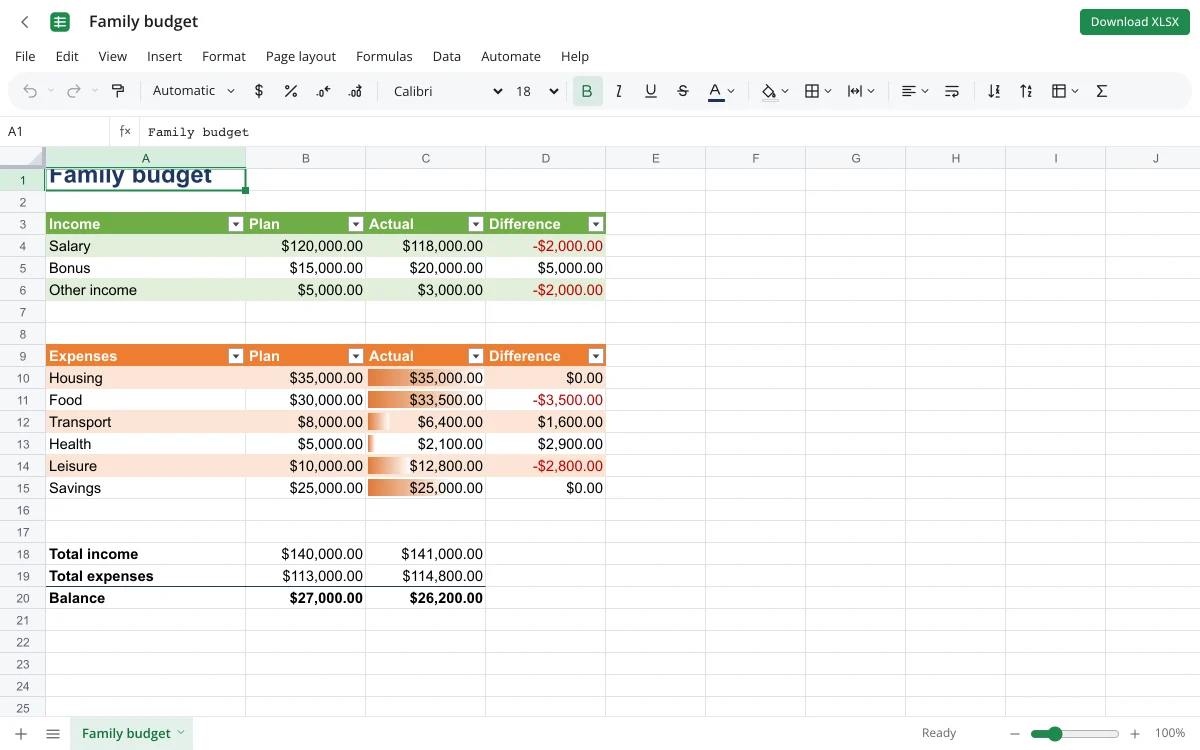
- Household budget templateA free household budget spreadsheet: income and expenses by category, plan versus actual, variances and totals calculated for you.
- Invoice templateAn invoice spreadsheet that does the math: line totals, subtotal, tax and grand total calculate automatically.
- Loan calculator with amortization scheduleA loan calculator spreadsheet with a full amortization schedule: monthly payment, total interest and month-by-month balance.
- Weekly planner templateA weekly planner spreadsheet with days across and hours down.
- Monthly habit trackerA monthly habit tracker spreadsheet with a checkbox for every day, a completion rate per habit and progress bars.
Getting started
1Open the editor
Click Open editor, or pick one of the tools below. A blank workbook is ready immediately — no installer, no email confirmation.
2Bring your data
Drop in an XLSX, ODS or CSV file from your computer, paste a table from anywhere, or start from a template such as a monthly budget or an invoice.
3Take it with you
Download the result as XLSX, ODS, CSV, PDF or HTML whenever you like. With a Zotu account, workbooks live in your cloud and save as you type.
Why people use Zotu Sheets
Formulas you already know
SUMIFS, VLOOKUP, XLOOKUP, INDEX/MATCH, LET, LAMBDA, FILTER and dynamic arrays behave the way you expect from desktop spreadsheet software.
Private by default
The tool pages process files locally. Nothing is uploaded unless you decide to keep a workbook in your cloud.
Faithful XLSX round trips
Formulas, number formats, merged cells, tables, conditional formatting, data validation and comments survive saving and reopening elsewhere.
Serious analysis
Pivot tables, Goal Seek, a solver, scenarios, an 18-tool analysis pack and exponential-smoothing forecasts are built in.
Comfortable on mobile
Tap to select, pinch to zoom, and panels that slide up from the bottom make small screens workable.
No ads, no watermarks
What you download is yours: no branding, no row limits, no nag screens.
Inside the full editor
Each page on this site does one job well — turn a CSV into a workbook, print a sheet to PDF, open a template. The full editor is where it all comes together for budgets, trackers, reports and dashboards.
Formula help
Autocomplete for functions and names, argument hints, step-by-step evaluation, precedent and dependent tracing, and background error checking.
Formatting
Number and date formats, cell styles and themes, borders, fills, rotated text, and conditional formats with data bars, color scales and icons.
Data tools
Multi-level and color sorting, filters, advanced filter, remove duplicates, text to columns, Flash Fill and subtotals.
Charts and printing
Seventeen chart types, sparklines, page setup, print areas, headers and footers, and PDF export with a live preview.
Frequently asked questions
Is it really free?
Yes. The editor and every tool are free, with no limits on rows, sheets or files.
Do I have to install anything?
No. Use a current version of Chrome, Edge, Firefox or Safari on any operating system.
Will my XLSX files open correctly?
Yes. XLSX and XLSM (macros are not run), ODS, CSV and TSV open with their formulas, formats and layout intact.
Where is my work stored?
Without an account, only in the open browser tab — download your file before closing it. With a Zotu account, it is saved to your cloud automatically.
How big can a sheet be?
Up to 1,048,576 rows by 16,384 columns. How fast a huge file feels depends on your device.
Are pivot tables and charts supported?
Yes: pivots with filters and grouping, seventeen chart types, sparklines and conditional formatting.
Can I use it for school or work?
Absolutely. People use it for expense tracking, grade books, schedules, reports and loan calculations — several of those come as ready-made templates.
Does it work offline?
The page has to load first; after that, editing and the conversion tools run on your device. Saving to the cloud needs a connection.
Start a spreadsheet now
No install and no sign-up. Your files stay on your device unless you choose to save them to the cloud.