CSV to Excel: open a CSV export as a spreadsheet
Turn CSV to Excel without an import wizard: drop in a bank, credit-card, CRM or payroll export and the converter builds an XLSX with the columns in place. The separator and encoding are detected, and the file is processed in your browser.
- Free
- No sign-up
- Detects encoding and separator
- File stays on your device
How to convert CSV to Excel
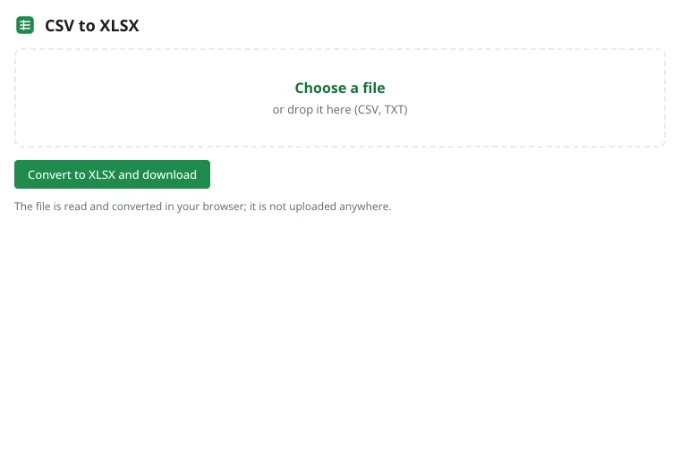
Choose a file
Drag a .csv or .txt file into the tool or click “Choose a file”. Files up to 100 MB are read on your device, so a bank or payroll export is not uploaded anywhere.
Check the preview
“First rows of the file” shows how the table will look. If accented names look wrong, change “Text encoding”; the separator — comma, semicolon or tab — is detected from the first lines and the preview updates at once.
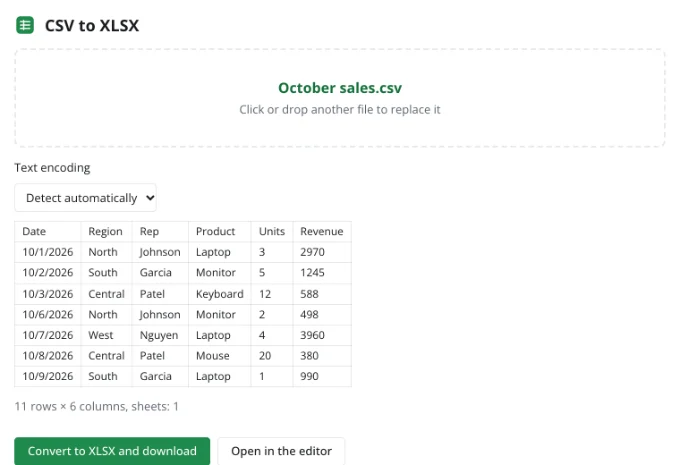
Convert to XLSX and download
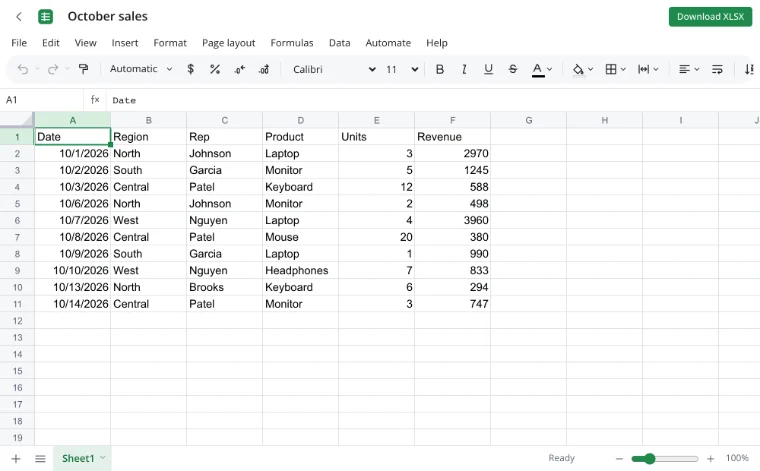
Click “Convert to XLSX and download” and the workbook lands in your downloads. Choose “Open in the editor” if you want to tidy the columns before saving.
Use cases
- A bank or credit-card export: transactions with dates and amounts become a table you can total and filter.
- A CRM or e-commerce export: customer names and order lines keep their columns.
- Payroll: hours and rates arrive as a text file and become a worksheet.
- Invoices to clients: an export of line items turns into a sheet you can send on.
- School grade sheets: a list of marks opens as a table for the term report.
What a CSV viewer shows
A CSV viewer reads a text file of separated values and lays it out as a table. Here the separator is detected from the first lines, and quoted fields, line breaks inside a cell and empty values follow the CSV rules. Values that look like numbers or dates are stored as real values, not as text.
That last point matters for a credit-card export: an amount read as text cannot be summed, and a date read as text cannot be sorted. The preview lets you check both before you download the workbook.
How the converter handles your file
| What it checks | How it handles it |
|---|---|
| Separator | Comma, semicolon or tab, detected from the first lines. |
| Encoding | UTF-8 with or without a BOM, UTF-16, Windows-1252 and ISO-8859-1; another can be picked by hand. |
| Quoted fields | Quotes inside quotes, line breaks in a cell and empty values follow the CSV rules. |
| Numbers | A decimal point or comma and thousands separators become real numbers. |
| Dates | Values such as 12/31/2026 are stored as dates. |
How do I open a bank export as a spreadsheet?
A bank or credit-card export usually arrives with a date, a description, an amount and a balance. Open it here and the columns line up, while amounts become numbers you can total or turn into a pivot table by category. If the bank writes a semicolon and a decimal comma, both are detected.
Nothing is uploaded, so a statement with account details stays on your device. Check the first rows, change the encoding if a payee name looks odd, then download the XLSX.
Can I edit a CSV file online?
Yes, but convert it first: click “Open in the editor” after the preview. There you can delete or reorder columns, split names, sort and filter, add formulas, build a chart and download the result as XLSX, ODS, CSV or PDF. Editing the CSV itself would lose formulas and formatting.
How do I keep leading zeros?
A ZIP code, product code or account number such as 00123 looks like a number, so it is read as 123. To keep the zeros, format the column as Text in the editor and paste or re-enter the values. This matters for payroll IDs, store SKUs and invoice numbers.
Limits
- One file at a time, up to 100 MB.
- CSV holds text only: formulas, formatting and several sheets are not saved in it.
- An unusual encoding can be detected wrongly; choose it by hand.
- There is no batch conversion: process files one by one.
Privacy
The file is read and converted in your browser and is not uploaded anywhere. A workbook reaches the cloud only if you click “Save to cloud” and sign in; cloud storage is in the EU/US under GDPR. Bank statements, payroll files and customer lists therefore stay on your device.
On your phone
The converter works in mobile browsers on Android and iPhone. Pick a file from Downloads or a cloud drive, check the preview and download the XLSX. For wide tables and cleanup, the editor is easier on a computer.
Frequently asked questions
Support: [email protected]
How to open a CSV file in browser?
Open the CSV to Excel page and choose the file. The browser reads it on your device and shows the first rows as a table, with the separator and text encoding detected. Check that the columns line up, then convert to XLSX or continue in the editor. The file is never uploaded to a server.
How to import CSV to Excel?
You do not need an import wizard: choose the CSV, check the preview and click “Convert to XLSX and download”. Numbers and dates are stored as values, and quoted fields with line breaks are handled. The workbook opens in any spreadsheet program, and the original CSV stays unchanged.
How to convert CSV to Excel with columns?
The converter detects the separator — comma, semicolon or tab — and splits the text into columns. If the columns are merged or split wrongly, change “Separator” and watch the preview update. Then download the XLSX; quoted fields and empty values follow the CSV rules.
How to export CSV to Excel?
Open the CSV in the converter and download the XLSX, or open the CSV in the editor and choose “File ▸ Download” → “Workbook (.xlsx)”. The workbook keeps formulas and formatting you add, while a CSV holds text and one sheet only.
How to open CSV file online?
Click “Choose a file” or drop the file into the tool. The browser reads it and shows the first rows as a table, with the separator and encoding already detected. From there you can download an XLSX or open the data in the editor. Nothing is installed.
How to change CSV to Excel?
Choose the CSV, confirm the preview and click “Convert to XLSX and download”. The result is a workbook with real columns, numbers and dates. If you need to clean up names or add formulas, click “Open in the editor” first and download from there.
How to upload CSV to Excel?
Nothing is uploaded: the file is read locally in your browser. Pick it from your device, check the first rows, then convert and download the XLSX. No account is needed, and the file is limited to 100 MB.
Is it free? Is there a watermark?
Yes, the converter is free: no payment, trial period or watermark. The limit is one file at a time, up to 100 MB. You can convert and download without an account; signing in is only needed to save a workbook to the cloud.
Is it safe to upload documents?
Nothing is uploaded: the file is read and converted in your browser on your own device. It reaches a server only if you choose “Save to cloud” and sign in, and then it is stored in the EU/US under GDPR. Bank statements and payroll files stay with you.
More tools
XLSX viewer
Open an XLSX workbook in the browser and save your edits back to the file.
Convert XLSX to CSV
Export a sheet from an XLSX workbook to CSV with a comma, semicolon or tab delimiter.
Convert TSV to XLSX
Convert TSV files or tab-separated text to XLSX: columns line up, numbers and dates are recognized, and any language's characters read correctly.
Excel to PDF
Turn a spreadsheet into a print-ready PDF with its layout, charts and headers.
Excel formulas
Write sums, averages, conditions and percentages with autocomplete and argument hints.
Household budget template
A free household budget spreadsheet: income and expenses by category, plan versus actual, variances and totals calculated for you.
Invoice template
An invoice spreadsheet that does the math: line totals, subtotal, tax and grand total calculate automatically.
Edit CSV files online
Edit CSV files online in a real grid: sort, filter, find and replace, remove duplicates and split columns, then save back to CSV without breaking quotes.
CSV to Excel: open a CSV export as a spreadsheet
Turn a CSV export into an XLSX workbook with real columns, numbers and dates.
Open editor