XLSX viewer: open an XLSX file online and edit it
Use this XLSX viewer to open a workbook without spreadsheet software: pick the file and it opens in the editor with its values, formulas, formats and charts. Read it, change cells and download it as XLSX. Nothing is installed or uploaded.
- Opens XLSX, XLSM, ODS and CSV
- Free
- No sign-up
- File stays on your device
How to open an XLSX file online
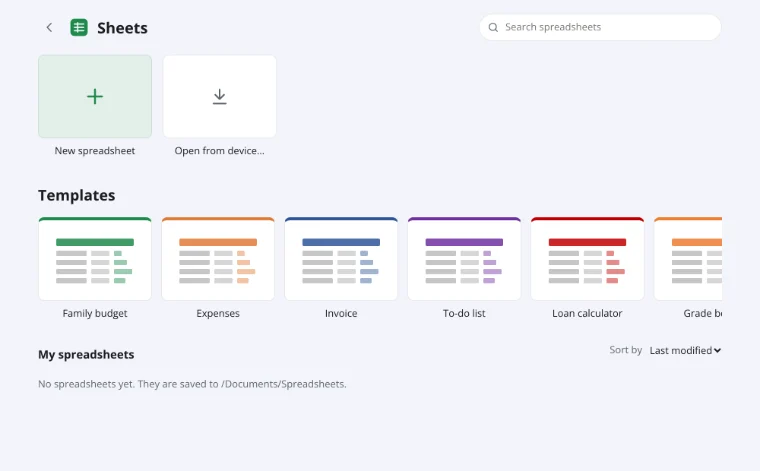
Open from device…
Click “Open from device…” and choose an XLSX, XLSM, ODS, CSV or TSV file. The workbook is read in your browser, with no upload.
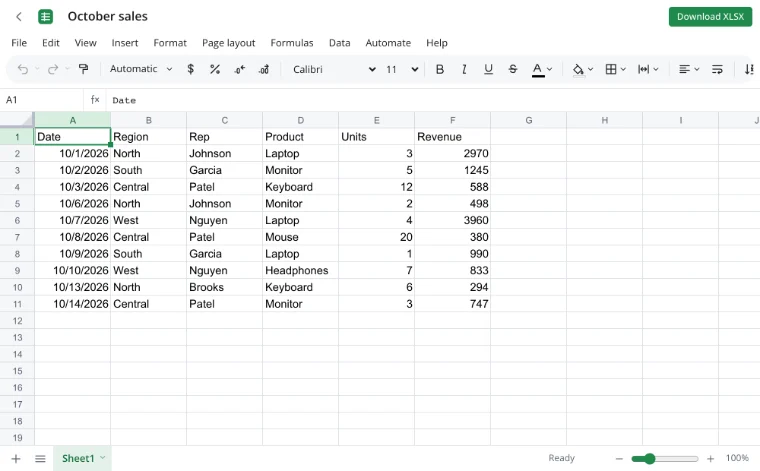
Edit in the editor
Formulas recalculate, and formats, smart tables, filters and charts stay in place. Switch sheets and change values directly in the cells.
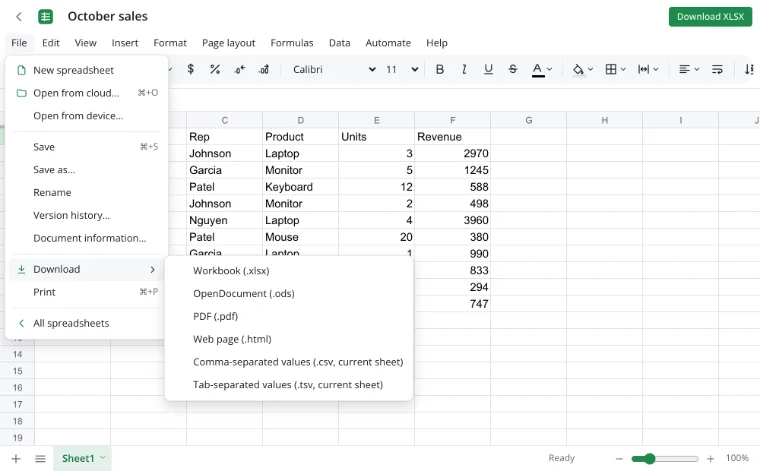
File ▸ Download
Choose “File ▸ Download” → “Workbook (.xlsx)” to save a copy. ODS, CSV, TSV, HTML and PDF are available too; “Save to cloud” keeps it in your account.
Use cases
- Open an attachment without a spreadsheet app: a colleague's report, a supplier's price list or a bank export.
- Check a workbook on a browser-only computer, then download the corrected file.
- Prepare an XLSX for a tax portal, or read a table on a phone.
How do I open an XLSX file online?
Open the XLSX viewer, click “Open from device…” and pick the file. It opens with formulas recalculated and formatting intact. There is no conversion step: XLSX is the format the editor reads and writes, so you can edit it and download it.
Can I edit Excel online without signing up?
Yes. Opening, editing and downloading a workbook needs no account. Change values and formulas, add rows and columns, set formats and filters, and build a chart. An account is needed only for cloud storage.
Does the XLSX viewer work in Chrome?
Yes, in current Chrome, Safari, Firefox and Edge on Windows, macOS, Android and iPhone. Nothing is installed: the browser reads the workbook itself. The page also opens XLSM, ODS, CSV and TSV.
What should I look for in an XLSX viewer?
A viewer should show the workbook as saved: values, formulas, number formats, merged cells, tables, filters and charts. It should also let you correct a cell and download the file. This one adds editing and export, and a finished sheet can go out through the Excel to PDF converter.
Features
| Feature | What it gives you |
|---|---|
| Opens | XLSX and XLSM, plus ODS, CSV and TSV. |
| Keeps | Values, formulas, formats, merged cells, tables and autofilter. |
| Edits | Cells, rows, columns, formats, filters and charts. |
| Exports | XLSX, ODS, CSV, TSV, HTML and PDF. |
| Extra data | Our additions sit in a separate part other programs ignore. |
Limits
- Legacy XLS (Excel 97–2003) does not open; save it as XLSX first.
- VBA macros are not executed: an XLSM opens, but saving writes XLSX.
- Real-time co-editing is not available: two people cannot type in one workbook.
Privacy
The workbook is opened and edited in your browser, so a price list or payroll file is not uploaded. It reaches a server only through “Save to cloud”; cloud files are stored in the EU/US under GDPR. A CSV export can be converted with the CSV to Excel converter.
Frequently asked questions
Support: [email protected]
How to open an XLSX file online?
Click “Open from device…” on the XLSX viewer page and choose the file. It opens in the editor with its values, formulas and formatting, and nothing is uploaded. Read it, change cells and download it back as XLSX or another format. No account is required.
How do I edit Excel online with multiple users?
Real-time co-editing is not available, so two people cannot type in the same workbook at once. Instead, save the file to the cloud, work in turns, or send a copy and compare the results. The version history helps you return to an earlier state.
How do I open an XLSX file in PDF?
Open the workbook in the editor and choose “File ▸ Download” → PDF, or use the Excel to PDF converter. Page size, orientation, margins and scaling come from the workbook's page setup, so set those first. The PDF keeps charts and headers.
Is it free? Is there a watermark?
Yes, the editor is free: no payment, trial period or watermark. The limits concern formats and file size, not the number of workbooks. You can open, edit and download a file without an account; signing in is only needed to keep it in the cloud.
Is it safe to upload documents?
Nothing is uploaded: the workbook is read and edited in your browser on your own device. It reaches a server only if you choose “Save to cloud” and sign in, and then it is stored in the EU/US under GDPR. A payroll file stays with you.
Does it open old XLS files and macros?
No. Legacy XLS files (Excel 97–2003) are not supported, so save them as XLSX first. VBA macros are not executed either: an XLSM opens and its data is preserved, but saving writes a regular XLSX without macros. Formulas and formats are kept.
More tools
CSV to Excel
Turn a CSV export into an XLSX workbook with real columns, numbers and dates.
Excel to PDF
Turn a spreadsheet into a print-ready PDF with its layout, charts and headers.
Convert XLSX to CSV
Export a sheet from an XLSX workbook to CSV with a comma, semicolon or tab delimiter.
Convert ODS to XLSX
Convert OpenDocument spreadsheets (ODS) to XLSX with sheets, formulas, number formats and styling intact.
Convert XLSX to ODS
Save an XLSX workbook as an OpenDocument spreadsheet (ODS) with all sheets, formulas, number formats and styling.
Excel formulas
Write sums, averages, conditions and percentages with autocomplete and argument hints.
Household budget template
A free household budget spreadsheet: income and expenses by category, plan versus actual, variances and totals calculated for you.
Invoice template
An invoice spreadsheet that does the math: line totals, subtotal, tax and grand total calculate automatically.
XLSX viewer: open an XLSX file online and edit it
Open an XLSX workbook in the browser and save your edits back to the file.
Open editor